Restaurant billing software

Restaurant billing software that keeps the queue moving.

Make a GST bill in a few taps, send the KOT to the kitchen from the same screen, take cash and UPI on one bill, and keep billing when the internet drops. On the phone, tablet or PC you already own.

✓ 7-day free trial ✓ No card needed ✓ Runs in the browser
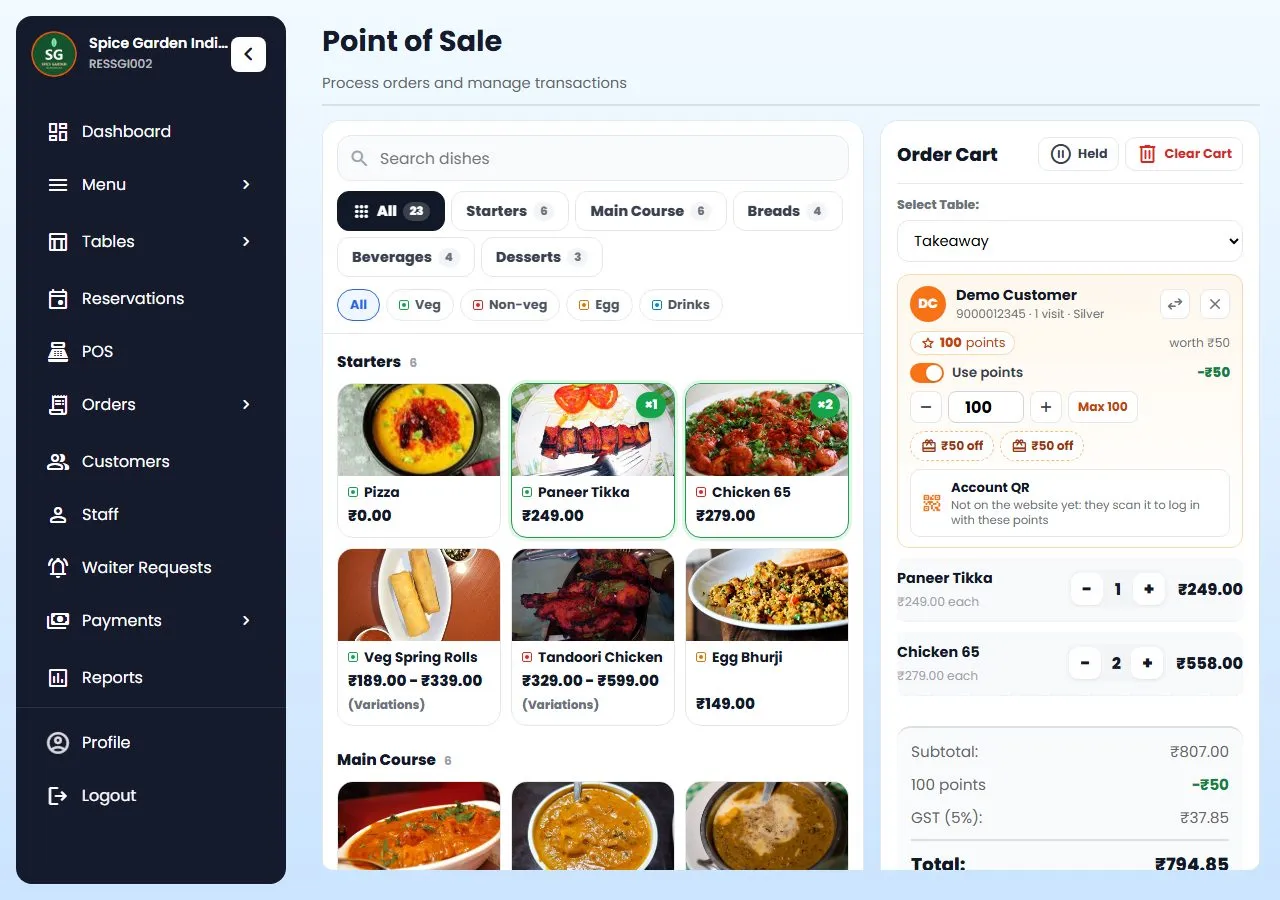
Restro Grow billing screen: dishes by category, the cart with loyalty points, GST and the total

What it is

Billing is the screen you use all day.

Restaurant billing software is the screen at your counter where you add dishes, add tax, take the payment and print the bill. In Restro Grow the same screen also sends the order to the kitchen, adds the customer's loyalty points and feeds your sales reports, so nothing is typed twice.

It runs in the browser on an Android tablet, iPad, Windows PC or phone, and prints on a normal thermal printer. Need tables, kitchen screens and staff logins too? See restaurant POS software, or everything Restro Grow does.

GST bills

Every bill with the right tax and your GSTIN.

Set your tax once in Settings and every bill works it out by itself. The same rule is used at the counter, on your website and on WhatsApp orders, so the totals always match.

  • Your GST rate on every bill, worked out after discounts.
  • Your GSTIN printed on the bill when you switch it on.
  • Bill numbers that count up 1, 2, 3 for each outlet, with no gaps.
  • A service charge if you take one, or menu prices that already include tax (as in Nepal).

Bill and KOT together

The kitchen gets the order from the same screen.

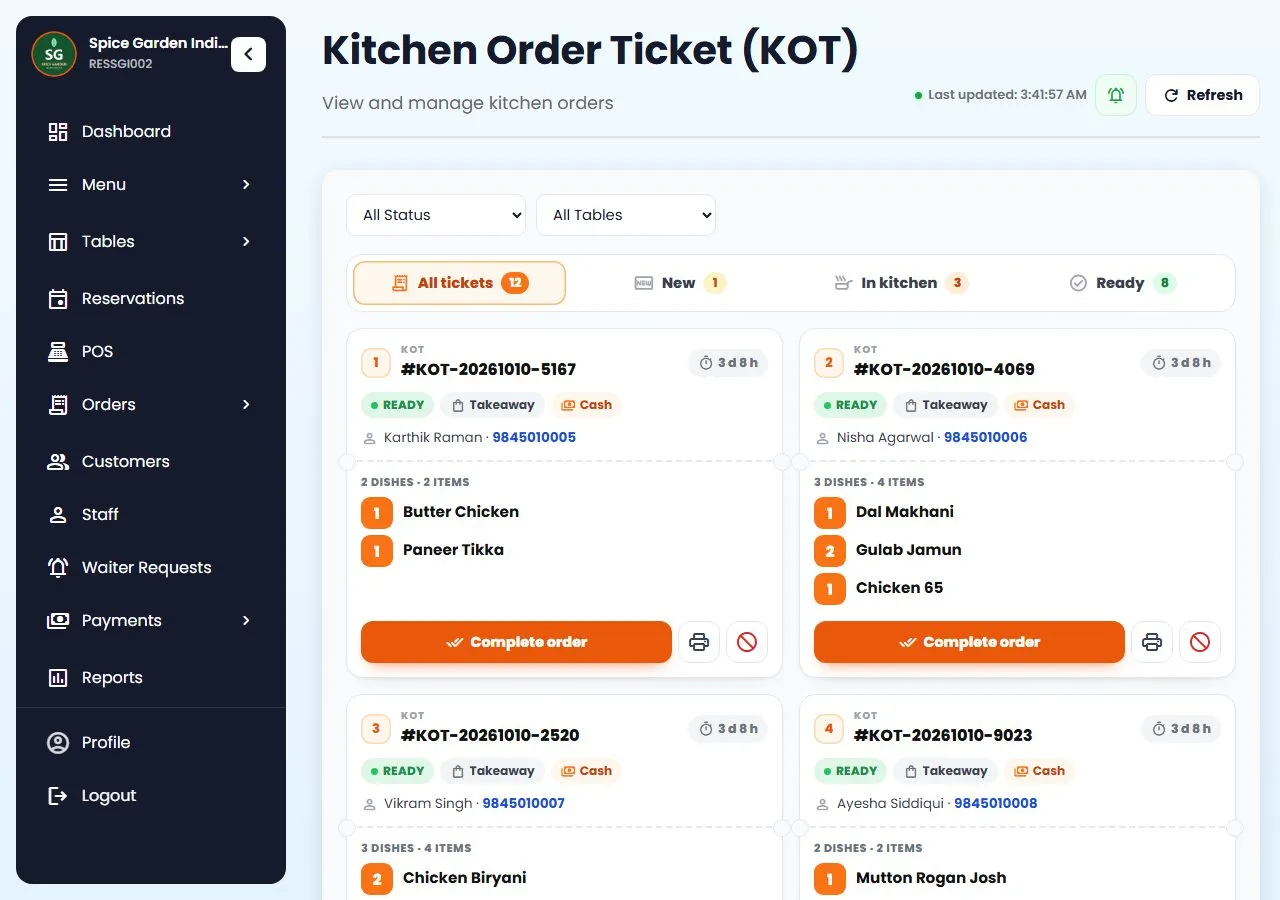
Press KOT and the order goes to the kitchen screen or the kitchen printer. If you run a bar, drinks go on their own Bar Order Ticket (BOT) to the bar.

  • KOT on screen or on paper: print it, or let the chef work from a kitchen display.
  • Drinks to the bar on a BOT, with its own number and its own printer.
  • Table QR orders reach the same kitchen, so the counter is not the only way in.
  • New to KOTs? Read what a KOT is and how it works.
Restro Grow KOT screen: kitchen tickets with status, order type, payment and timers every ticket, live

End of the day

Close the day without a notebook.

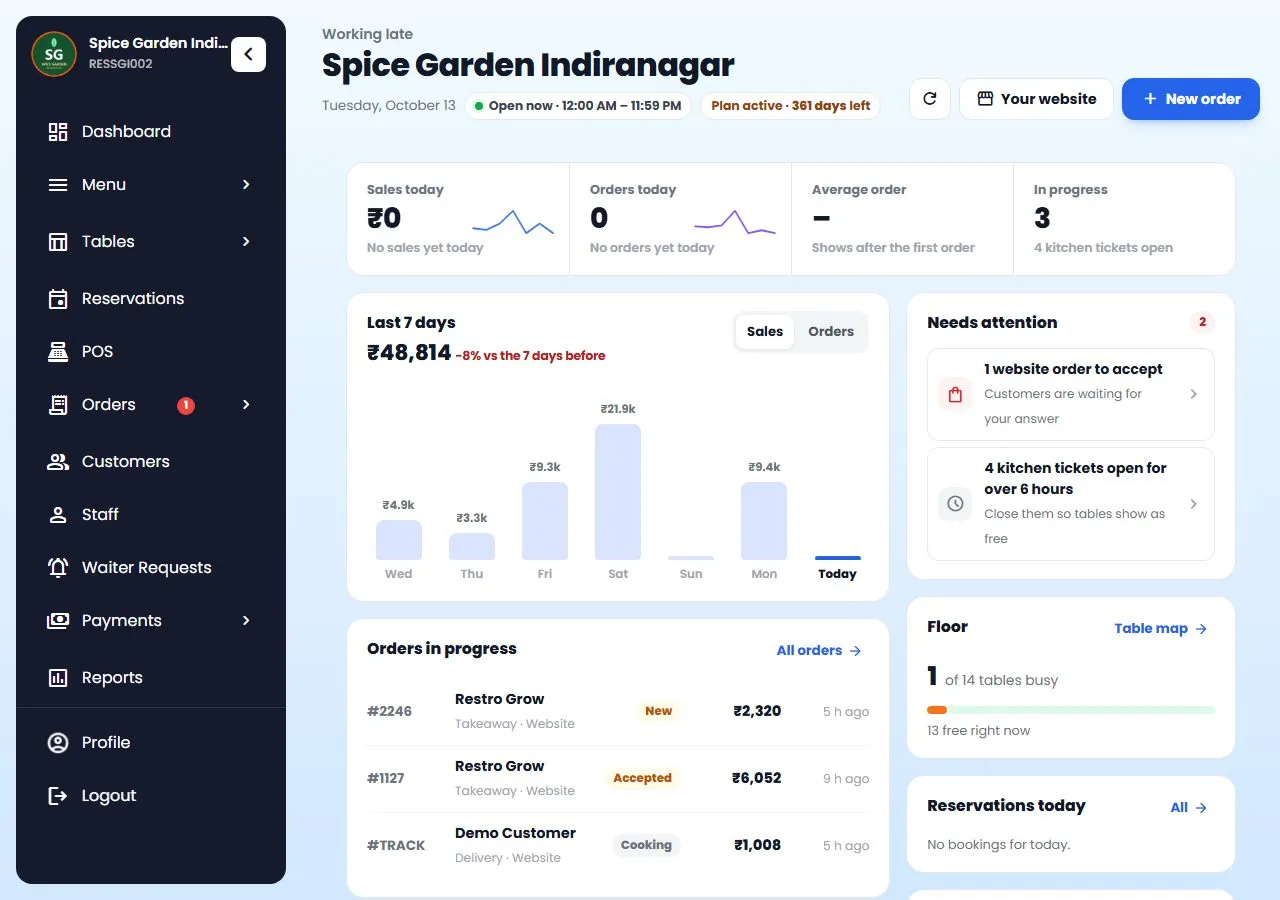
Every bill lands in your reports. Check today's sales from home, see which dishes sell, and see who discounted or cancelled what.

  • Today's sales, top dishes and busiest hours on the dashboard.
  • An activity log of cancels, discounts, refunds and price changes, with the staff member's name.
  • Menu analysis that sorts dishes into stars, workhorses, puzzles and dogs.
  • One login for every branch on the Multiple Locations plan.
Restro Grow owner dashboard with sales, orders and top dishes

Built for the counter

The small things that save minutes.

All of this is in the product today.

⌨️

Search with “/”

Press / and type a dish name; Enter adds the only match. Filter veg, non-veg and egg, and pick sizes and add-ons on the same screen.

💳

Split and part payments

Tap two or more payment methods to split one bill, for example UPI and cash. Or take part of the amount now and leave the rest as due.

📶

Billing without internet

If the internet drops, bills still print and wait on the device with an offline number. They sync by themselves when you are back online.

🖨️

Thermal printers

Print on 58 mm or 80 mm thermal printers over Bluetooth, USB or the network. Not sure which to buy? See our KOT printer guide.

🏷️

Discounts with limits

Give a percentage or a flat discount. It can never take the bill below zero, and every discount is saved in the activity log.

⏸️

Hold a bill

Put a bill on hold while the guest decides, bill the next person in the queue, then pick it up again.

🎁

Loyalty at the counter

Type the customer's phone number to see their points and wallet, use them on the bill, and let today's bill earn new points. See Loyalty.

🧾

A Cashier login

Give the counter its own Cashier login, made for billing: POS, payments, orders and customers.

📱

Works on what you have

Android tablet, iPad, Windows PC or phone. Browser Bluetooth printing works in Chrome or Edge on Android, Windows and Mac.

How it works

From sign-up to first bill.

Create your account

Your restaurant's name, phone and city. No credit card.

Add your menu and tax

Dishes, prices, sizes and add-ons. Set your GST rate and switch on your GSTIN for the bill.

Connect a printer

Choose Bluetooth, USB or network in the printer settings, or skip it and go paperless.

Start billing

Tap the dishes, send the KOT, and press Pay when the guest is done.

Stuck on a step? Call or WhatsApp +91 63775 68749 and we'll set it up with you.

Questions

Billing questions, answered

Something else? Message us on WhatsApp and talk to a person.

Does it make GST bills?

Yes. You set your tax name and rate (for example GST 5%) once, and every bill adds it after discounts. You can print your GSTIN on the bill and add a service charge if you take one. Check the right rate for your restaurant with your CA.

What happens when the internet goes down?

The POS keeps billing offline and the bills sync by themselves when the internet is back. Loyalty points need the internet.

Which printer do I need?

Any 58 mm or 80 mm thermal printer. Restro Grow prints over Bluetooth, USB or the network, and can send bar tickets to a separate bar printer. In the browser, Bluetooth printing works in Chrome or Edge on Android, Windows and Mac; iPhone and iPad browsers can't use Bluetooth printers.

Can a customer pay part in cash and part by UPI?

Yes. Tap two or more payment methods on the same bill and enter how much goes on each. You can also take part of the amount now and leave the rest as due.

Do I need to buy new hardware?

No. Restro Grow runs in the browser on the Android tablet, iPad, Windows PC or phone you already have. Bills and KOTs print on thermal printers over Bluetooth, USB or the network.

Can I stop staff from giving away discounts?

Every discount is capped so the bill can't go below zero, and every discount, cancel and price change is saved in the activity log with the staff member's name. Each staff member gets their own login by role.

How much does it cost?

Restro Grow is a flat monthly plan, with no setup fee and no commission on orders from your own website. See the plans in our pricing section. 7-day free trial on every plan. No credit card needed, cancel anytime, set up in about 5 minutes.

Can I use it in Nepal?

Yes. Bills can use menu prices that already include VAT, with a service charge. See Restro Grow in Nepal.
Keep reading

More about running the counter

Make tonight's bills on Restro Grow.

Set up your menu, tax and printer this afternoon and bill your first table tonight.

Start free trial Talk to us

7-day free trial on every plan. No credit card needed, cancel anytime, set up in about 5 minutes. See plans and pricing.

WhatsApp Free trial