Restaurant POS software

Restaurant POS software for the counter, kitchen and bar.

Bill at the counter, send KOTs to the kitchen and drinks to the bar, see every table at a glance, and give each staff member a login that shows only their job. On the devices you already have.

✓ 7-day free trial ✓ No card needed ✓ Phone, tablet or PC
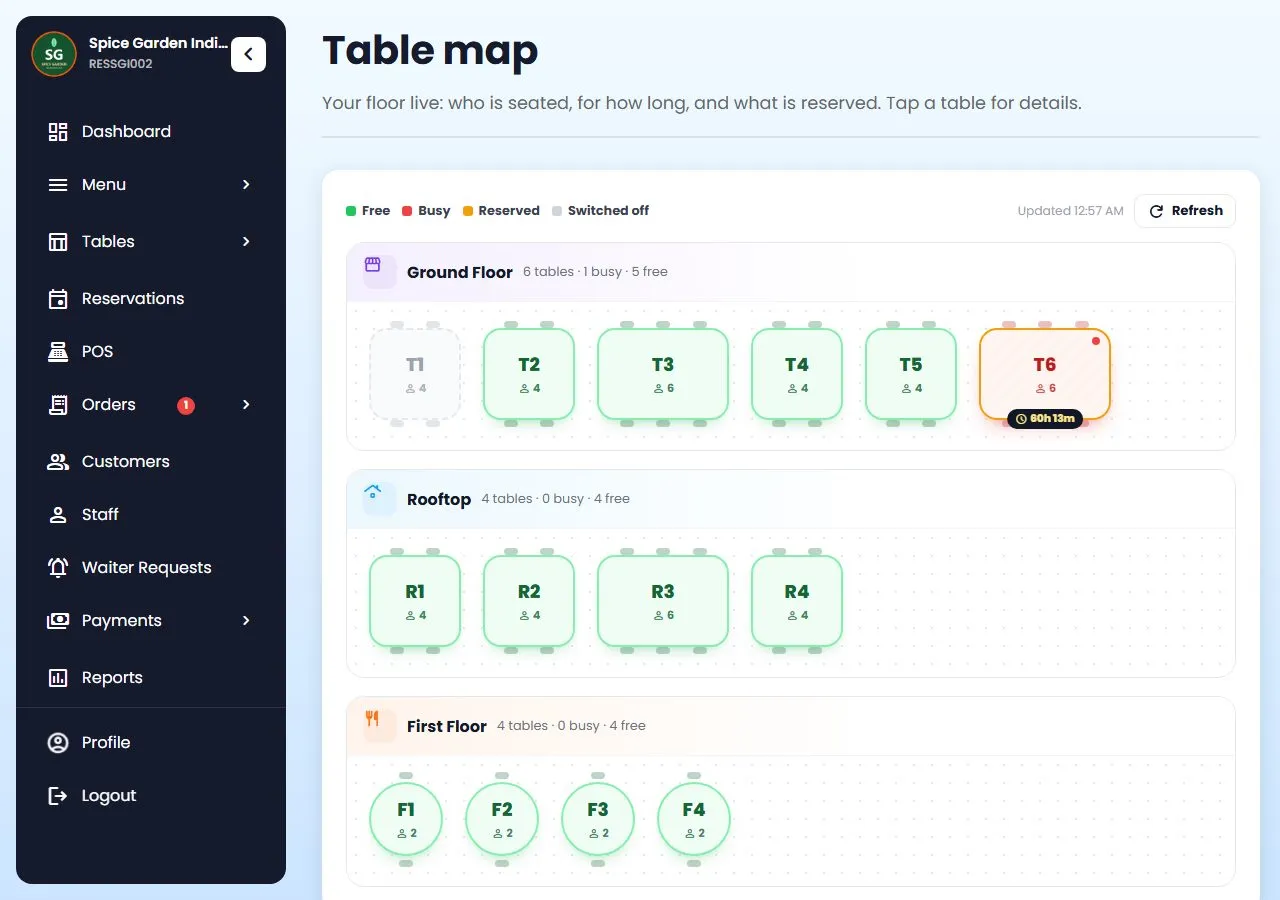
Restro Grow table map: tables by floor, free, busy with time, reserved and switched off

What a POS should do

A POS is more than a billing screen.

Billing is one part of it. A restaurant POS system also has to get each order to the right person: the chef, the bartender, the waiter taking it to table 6. Restro Grow connects all of them, so an order taken at the counter, on a waiter's phone or from a table QR shows up where it is needed.

Only need fast billing? Start with restaurant billing software. Want the full picture? See everything Restro Grow does.

Kitchen display

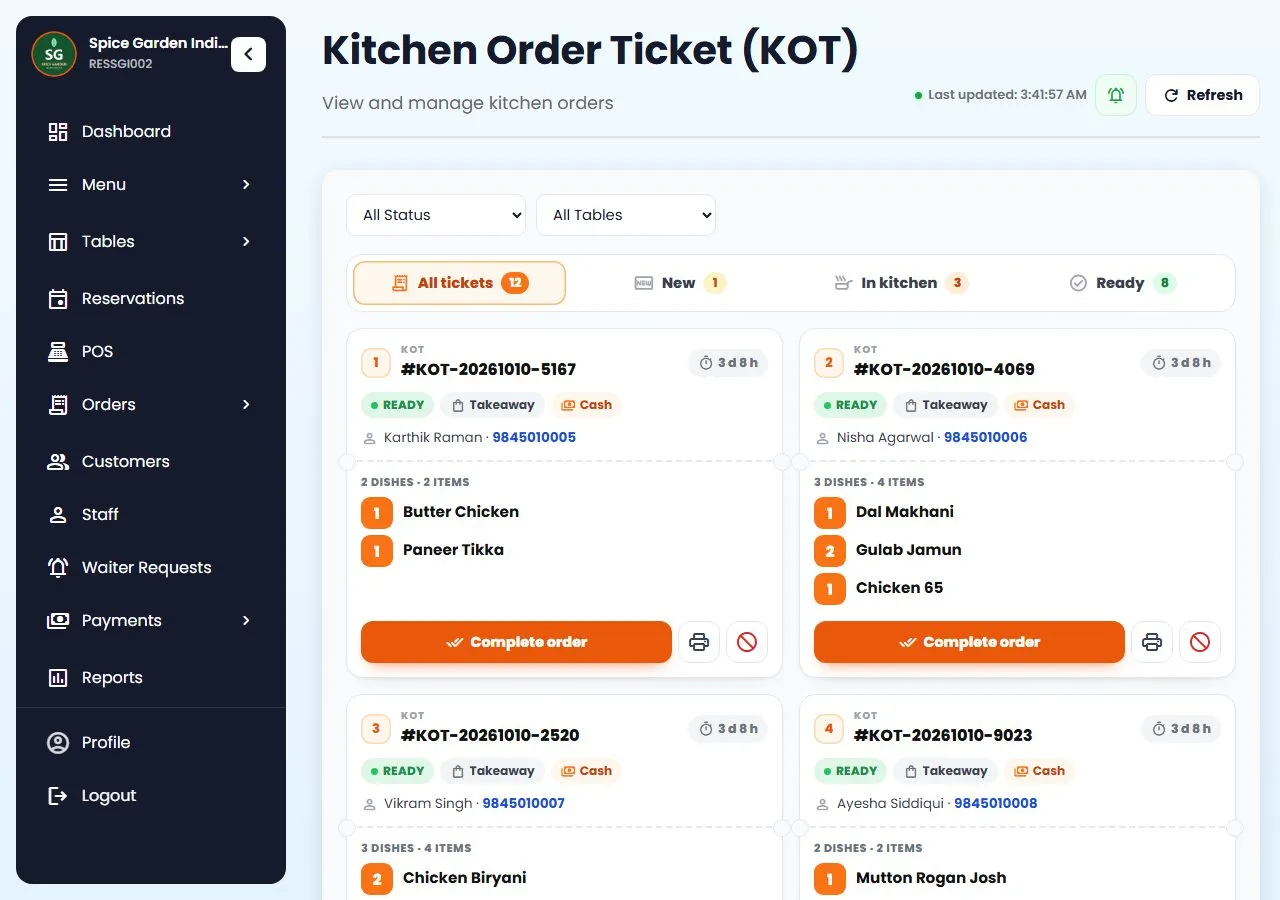
The kitchen sees the order the second it's sent.

Orders from the counter, a waiter's phone and table QR codes become KOTs. Chefs work from a screen, from printed tickets, or both.

  • New, Cooking, Ready: chefs move a ticket along with one tap.
  • A timer on every ticket turns amber at 10 minutes and red at 20.
  • Waiters' phones ring when food is ready to serve.
  • Any tablet can be the kitchen screen. See how a kitchen display works.
Restro Grow kitchen tickets with New, In kitchen and Ready counts and a timer on each ticket

Bar Order Tickets

Drinks to the bar, food to the kitchen.

Mark a category, or a single dish, as made at the bar. When an order has both, Restro Grow makes a KOT for the kitchen and a BOT for the bar, each with its own number.

  • A bar screen that shows only drinks, for your bartender.
  • A separate bar printer, set in the printer settings.
  • Each ticket moves on its own; the order is ready when both are.
  • A Bartender login that opens on the bar tickets.

One order list

Counter, tables, website and WhatsApp in one place.

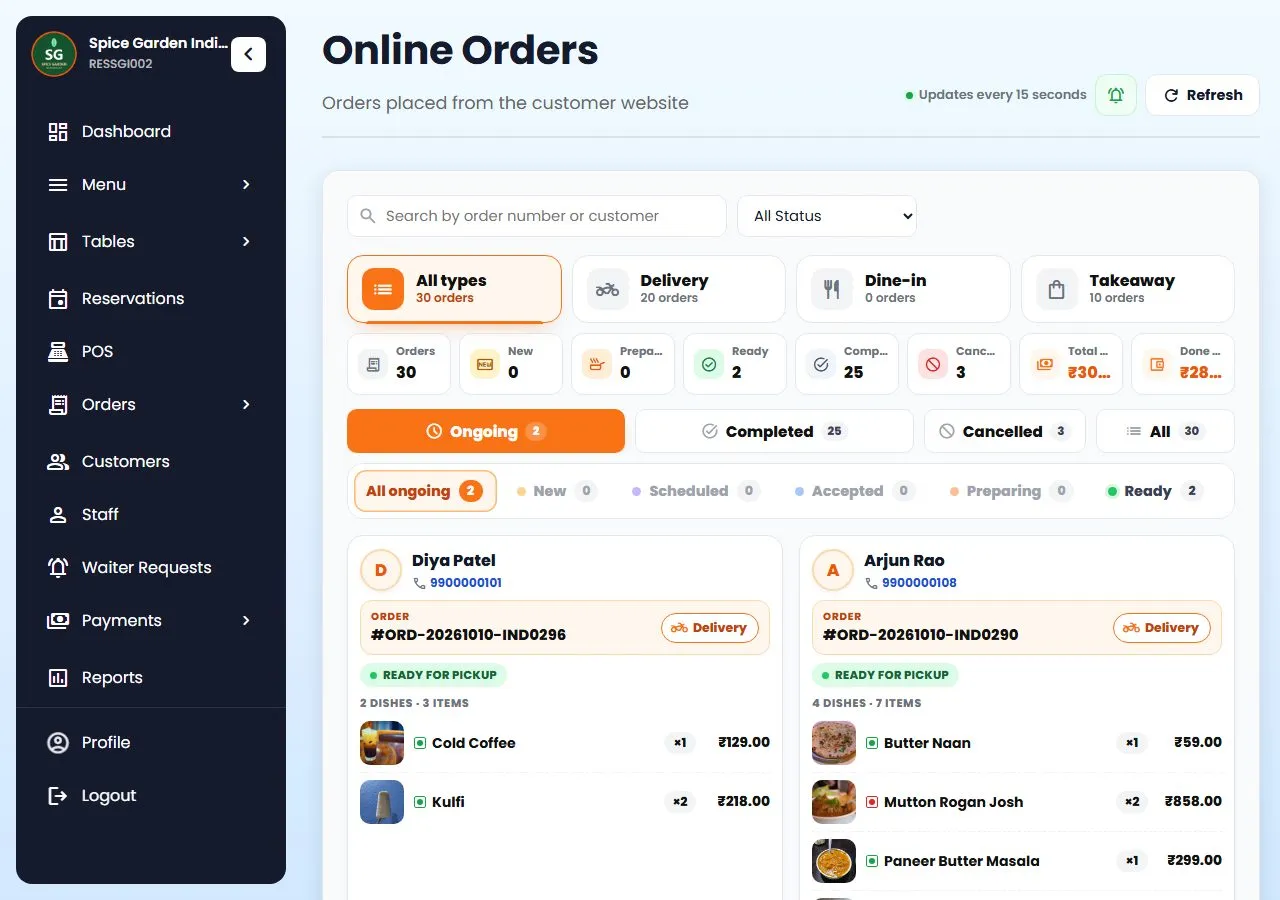
Orders from your own ordering website, table QR codes and WhatsApp sit next to counter bills. A new-order alert keeps ringing on the dashboard until someone accepts it.

  • Dine-in, takeaway and delivery each marked clearly.
  • Your own ordering website, with 0% commission on its orders.
  • Delivery riders with their own login, and live tracking for the customer.
  • Fake-order protection: numbers whose orders you keep rejecting get blocked.
Restro Grow online orders screen with delivery, dine-in and takeaway counts and order cards

Run the whole floor

Everything else a busy restaurant needs.

Included in Restro Grow, and all in the product today.

🪑

Live table map

Every table by area: free, busy (and for how long), reserved or switched off.

📅

Table reservations

Guests book a table online, and the same table can't be booked twice for the same time.

👥

Staff roles

Manager, Waiter, Chef, Bartender, Cashier and Delivery rider. Each login sees only the screens for that job.

📱

Owner and staff apps

Apps for the owner and for waiters, chefs and managers, with alerts for new orders, waiter calls and food that's ready.

📦

Inventory

Save a recipe for each dish and stock goes down as orders are made. Low-stock alerts, and dishes go sold out by themselves.

📶

Offline billing

If the internet drops, the POS keeps billing and the bills sync when it's back.

🏢

Multiple outlets

Switch between branches from one login and compare today's numbers side by side.

📊

Reports

Sales, top dishes, busiest hours, cancel reasons, and a menu analysis that shows which dishes earn and which don't.

🕵️

Activity log

Who cancelled an order, gave a discount or changed a price, and when.
How it works

Up and running before dinner.

Create your account

Your restaurant's name, phone and city. No credit card.

Add menu, tables and staff

Dishes with prices, tables by area, and a login for each staff member by role.

Set up kitchen and bar

Choose what's made at the bar, connect printers, or open the kitchen screen on a tablet.

Open for service

Bill at the counter, let waiters take orders on their phones, and watch the tickets move.

Stuck on a step? Call or WhatsApp +91 63775 68749 and we'll set it up with you.

Questions

POS questions, answered

Something else? Message us on WhatsApp and talk to a person.

What devices does the POS run on?

It runs in the browser on an Android tablet, iPad, Windows PC or phone, and there are apps for the owner and for staff. You don't need special POS hardware.

Do I need a kitchen screen, or can I print KOTs?

Either. Print KOTs on a thermal printer, open the kitchen display on any tablet with a browser, or use both.

We have a bar. Can drinks go separately?

Yes. Mark the categories or dishes made at the bar. Those items go on a Bar Order Ticket (BOT) to the bar screen and the bar printer, while the food goes on the KOT to the kitchen.

Can I control what each staff member sees?

Yes. Each person gets a login with a role: Manager, Waiter, Chef, Bartender, Cashier or Delivery rider. Each role sees only its own screens, and the activity log shows who did what.

Does it take Swiggy and Zomato orders?

Not inside the POS today. Many owners keep the delivery apps for new customers and use QR codes, WhatsApp and loyalty in Restro Grow to bring regulars to their own website, where there is no commission.

What happens when the internet goes down?

The POS keeps billing offline and the bills sync by themselves when the internet is back. Loyalty points need the internet.

Can I run more than one outlet?

Yes. The Multiple Locations plan gives owners a branch switcher to compare today's numbers per branch and open any branch from one login.

Will you help me set it up?

Yes. Call or WhatsApp +91 63775 68749 and we'll set it up with you.

Keep reading

Go deeper

Run tonight's service on Restro Grow.

Counter, kitchen, bar and tables on one system, set up this afternoon.

Start free trial Talk to us

7-day free trial on every plan. No credit card needed, cancel anytime, set up in about 5 minutes. See plans and pricing.

WhatsApp Free trial